
Using Admin Panel:
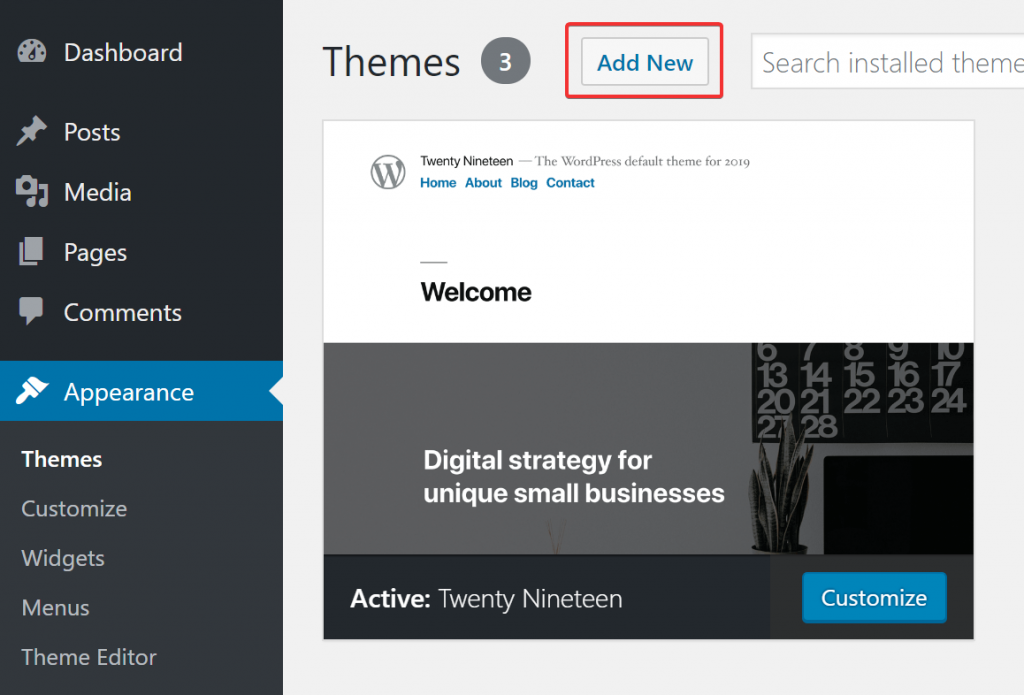
- Step 1: Log in to your WordPress admin panel and navigate to Appearance → Themes.
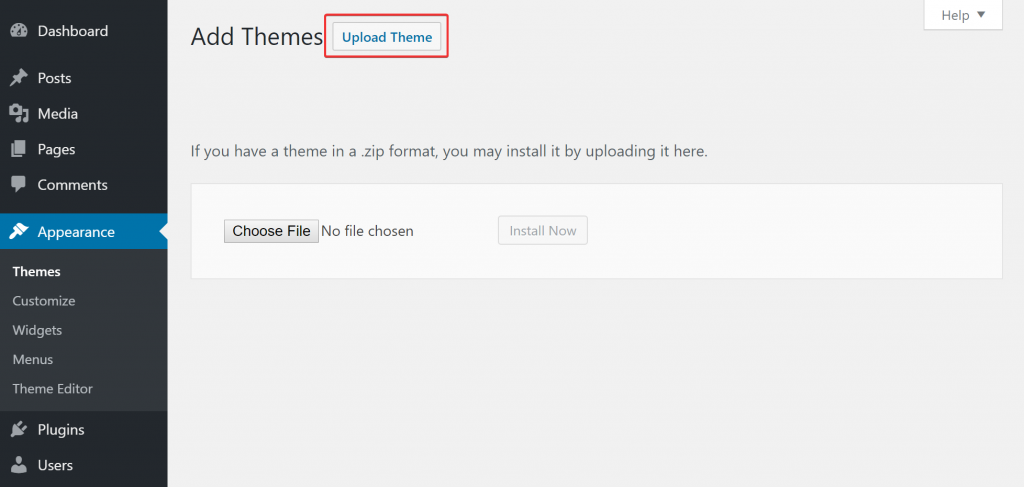
- Step 2: Click the Add New button at the top of the page, then click the Upload Theme button on the next page.
- Step 3: Select the
your_theme.zipfile included in the files downloaded from ThemeForest and click Install Now. - Final Step: Once the file is uploaded and installed, click Activate.
Using FTP:
- Use an FTP client to access your host web server.
- Navigate to the
wp-content/themesdirectory provided by WordPress. - Extract the theme from the archive.
- Upload the extracted theme folder to the
wp-content/themes/your_themedirectory on your host server.
Using cPanel:
- Log in to your cPanel account.
- Go to File Manager and navigate to the
wp-content/themesdirectory. - Click the Upload button and upload the
your_theme.zipfile. - Once the upload is complete, return to the
wp-content/themesdirectory. - Select the uploaded
your_theme.zipfile and click Extract. - After extraction, the theme folder will appear in the
wp-content/themesdirectory. - Log in to your WordPress admin panel, navigate to Appearance → Themes, and you will see the newly uploaded theme. Click Activate to enable it.